Smart Routing
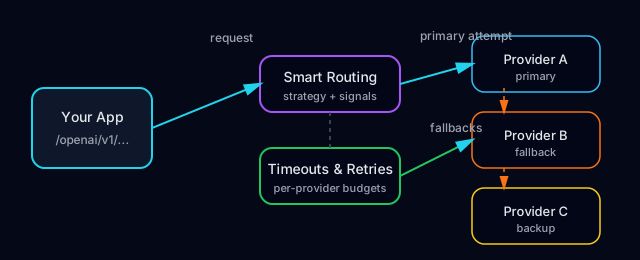
Smart Routing is MultiRoute’s routing engine. It sits between your application and multiple AI model providers and decides, for every request, which provider and model to use based on your preferences for cost, latency, and quality, while handling timeouts, retries, and failover on your behalf.
This guide explains how Smart Routing works so you can design for reliability and performance without hard-coding provider-specific logic into your app.
What Smart Routing Does
When your application sends a request to a /openai/v1 endpoint, Smart Routing:
- Identifies the project and API key.
- Loads the active routing configuration for that project and endpoint (including Smart Routing settings).
- Evaluates candidate providers and models against your evaluation weights (cost, latency, and quality).
- Selects the best provider and model for this request.
- Applies timeouts and retries according to your failover settings.
- Falls back to alternate models or providers when the primary choice is unhealthy or failing.
- Returns the response (or an error) back to your application.
Routing decisions can depend on:
- The endpoint (e.g.
/openai/v1/chat/completions). - The requested model or routing profile.
- Your Smart Routing weights (for cost, latency, and quality).
- Project-level defaults and environment (dev, staging, prod).
Scoring and Preferences
Smart Routing uses evaluation weights that control how much each dimension contributes to the final score for each request. For example:
- Accuracy / quality — How well a model is expected to follow instructions and produce useful outputs.
- Cost efficiency — The relative price of using that model for a request.
- Time efficiency — Typical response latency for that model and provider.
You configure these preferences in the settings UI or via the settings API. Once configured, you do not need to change your application code—Smart Routing continuously applies your chosen weights to each request to select the best available model.
Inputs to Routing Decisions
For a given request, Smart Routing considers:
- Configuration:
- Enabled providers and models for the current project.
- Any routing profiles or overrides.
- Your evaluation weights.
- Request context:
- The endpoint and requested model (if any).
- Environment or project-level defaults.
- Operational signals:
- Recent latency and error rates per provider/model.
- Provider health (outages, throttling, or persistent failures).
The combination of configuration, request context, and operational signals allows Smart Routing to choose sensible defaults while adapting to real-world conditions.
Timeouts
Every request to an underlying provider is subject to a timeout. The timeout limits how long Smart Routing will wait for a response from a chosen provider before treating that attempt as failed.
Timeouts can be:
- Global defaults: Applied to all requests unless overridden.
- Per-profile or per-model overrides: For example, allowing longer timeouts for more complex reasoning tasks.
Choosing timeouts involves a tradeoff between:
- User experience: Long timeouts can lead to slow responses.
- Accuracy and completeness: Some models may need more time for complex tasks.
In general:
- For UI-bound calls, prefer shorter timeouts and aggressive failover.
- For offline or batch jobs, you can often tolerate longer timeouts.
Retries
When a request to a provider fails with a retryable error (such as a transient network issue), Smart Routing may retry the request according to your configured policy.
Retries are usually:
- Limited in count (e.g. a small number of attempts).
- Guarded by overall timeout budgets so that retries do not cause unbounded delays.
- Scoped to specific error types; for example, Smart Routing will not retry on validation errors that are caused by an invalid prompt or parameters.
Retries add resilience, but also:
- Increase total latency when providers are degraded.
- Can increase underlying provider usage if not configured carefully.
Use retries primarily for transient failures, not as a substitute for fixing invalid requests or quotas.
Failover and Fallbacks
If a provider or model is repeatedly failing or unavailable, Smart Routing can fail over to an alternate model according to your routing configuration and Smart Routing preferences.
Fallback behavior typically includes:
- Promoting a secondary model to primary when the primary is unhealthy.
- Skipping models that are returning persistent errors for the current request.
- Routing to backup providers if your main provider is experiencing an outage.
You control:
- Which models are eligible as fallbacks.
- Whether failover is allowed for a given profile.
- How quickly Smart Routing should give up on a failing model.
For critical workloads, configure at least one viable fallback model so interruptions from a single provider are minimized.
Consistency and Idempotency
Retries and failovers can result in the same logical request being sent to one or more providers. To make this safe:
- Design requests to be idempotent where possible.
- Use idempotency keys or unique request identifiers in your own systems when an operation has side effects.
- Be aware that different models may produce different outputs for the same prompt if a fallback is used.
Smart Routing focuses on maximizing availability and responsiveness; your application should account for this when building workflows that must be strictly consistent.
Observing Smart Routing Behavior
To understand how Smart Routing behaves in practice:
- Use the dashboard logs and metrics to see which providers and models handled each request.
- Track request IDs in your logs to diagnose when retries or fallbacks were triggered.
- Compare latency, cost, and error rates across routing profiles when tuning Smart Routing weights, timeouts, and retries.
Combining clear Smart Routing configuration with good observability gives you a predictable and debuggable system, even as you evolve your provider and model mix over time.